
Smarter Online Class Monitoring for Better Teaching Quality
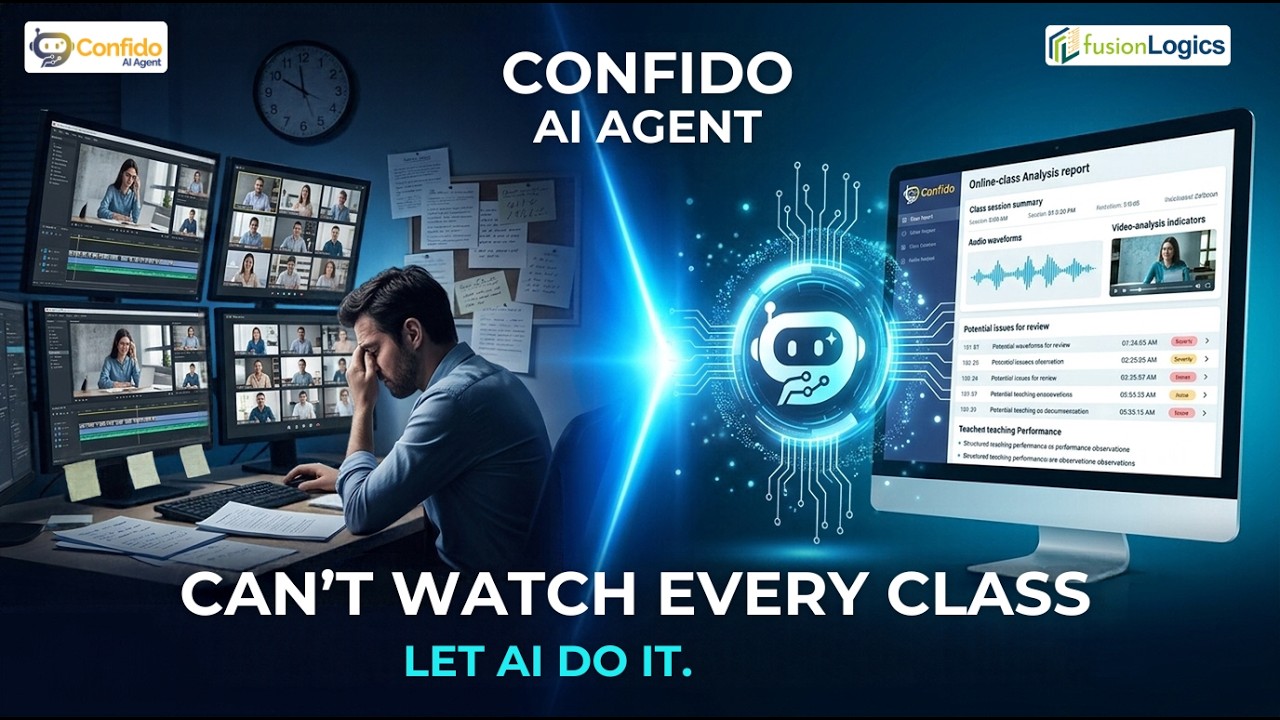
Confido AI Agent helps online academies review class recordings and teacher screen activity with AI-powered insights and clear reports. Identify potential issues, focus on important moments, and support better-informed decisions about teaching quality.
-
 Microsoft Teams
-
 Zoom
-
 Google Meet
-
 WhatsApp
-
 Confido360
Common Challenges in Online Class Monitoring
Time-Consuming Manual Reviews
Reviewing lengthy class recordings and screen activity takes valuable time.
Important Issues Can Be Missed
Potential concerns such as long silences, background noise, or off-topic conversations may go unnoticed.
Inconsistent Teacher Evaluations
Without organized observations and supporting evidence, teacher evaluations may vary between reviewers.
Scattered Class Information
Recordings, screen activity, and notes can be difficult to bring together for a clear overview.
Turn Class Activity Into Clear, Useful Insights
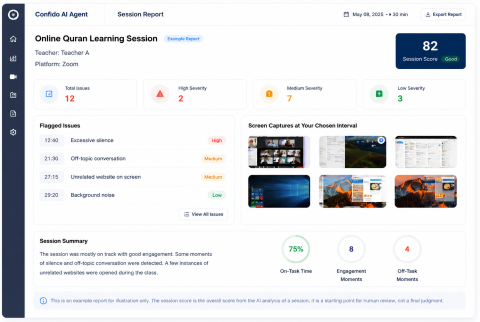
Confido AI Agent organizes AI-generated observations into clear reports, helping reviewers understand class activity and identify areas that may need a closer look.
- Important observations and timestamps
- Flagged issues for further review
- Available teacher screen captures
- Class summaries and overviews
Features That Improve Online Teaching Quality
Review available class recordings and screen activity, explore AI-highlighted observations, and use organized reports to guide follow-up.
Teacher Screen Activity
Review available screen captures to understand relevant on-screen activity during lessons.
Class Recording Analysis
Review available class recordings and find moments that may need further attention.
AI-Powered Audio and Video Analysis
Highlights potential concerns such as extended silence, background noise, off-topic conversations, or inappropriate language in supported class data.
Screen Activity Review
Examine available screen activity to understand what was happening on the teacher's screen during a lesson.
Teacher Behaviour Insights
Use organized observations to support teacher reviews and identify areas where constructive feedback may help.
AI-Generated Reports
Review relevant findings in structured reports and dashboard views, making class observations easier to understand.
How Confido AI Agent Works
From class monitoring to informed follow-up in four simple steps.
Monitor
Work with available class recordings, monitoring data, and teacher screen activity.
Analyze
AI analyzes supported class data to identify important observations and potential concerns.
Alert
Highlights relevant findings in the available dashboard and reporting workflow so managers can review them.
Improve
Use human judgment to provide feedback, investigate concerns, and support improvement.
Support Better Decisions With Clear Class Insights
Prioritize Reviews
Focus review efforts on flagged observations and relevant moments instead of relying entirely on full-length recording reviews.
Create a More Consistent Review Process
Structured reports help reviewers work from organized observations and support a more consistent review process.
Support Constructive Teacher Feedback
Use relevant observations to guide clear, constructive discussions with teachers.
Gain Better Visibility Into Online Classes
Gain a clearer view of monitored class activity and identify areas that may need attention.
AI Insights, Human Decisions
AI-generated observations support the review process, but they do not replace professional judgment. Your team reviews the findings, considers the context, and decides what action, if any, is appropriate.
-
Human Review Comes First
Use AI findings as a starting point and review the available evidence before making decisions.
-
Clear Monitoring Policies
Set clear monitoring policies so staff understand what information is collected, when it is collected, and why.
-
Staff Awareness and Consent
Make sure staff are aware of monitoring and obtain any consent required by your policies or local rules.
-
Responsible Handling of Recordings
Manage recordings and screen activity according to your academy's policies and limit access to authorized people.
Designed for Online Education Teams
Online Quran Academies
Review online lessons across multiple teachers and classes.
Online Tutoring Businesses
Support a more consistent approach to reviewing online tutoring sessions.
Online Schools and Learning Providers
Help academic teams organize class reviews and identify opportunities for improvement.
Frequently Asked Questions
What is Confido AI Agent?
Confido AI Agent is an AI-powered solution that helps online academies review available class recordings and teacher screen activity. It organizes relevant observations into reports to help managers identify potential issues and support teaching quality reviews.
How does it help online academies review classes?
Reviewers can use AI-generated reports to find relevant observations and decide which classes or moments need closer attention, rather than relying entirely on watching every recording from beginning to end.
Can it analyze every class automatically?
The classes and data available for analysis depend on how Confido AI Agent is installed and configured in your academy. We can discuss your setup during a demo.
Does AI make the final decision about a teacher's performance?
No. AI-generated observations support the review process. Your team reviews the available recordings and reports, applies professional judgment, and decides what feedback or follow-up is appropriate.
Which platforms and class workflows does it support?
Confido AI Agent works with online classes held on Microsoft Teams and Zoom, can record WhatsApp calls made from systems where it is installed, and integrates with Confido360. For your specific class setup, please book a demo and we'll confirm how it fits.
How are class recordings and monitoring data handled?
Monitoring should follow your academy's policies, with staff awareness and any consent required. For details about how recordings and screen captures are stored and accessed, please contact us.
How can I learn about pricing?
See our pricing plans, or contact us for a quote based on your number of teachers and classes.
How can I request a demo?
Choose a time on our demo booking page, or call us on +92 370 9090301.
See How Confido AI Agent Can Support Your Academy
Discover how AI-assisted class reviews can help your team organize monitoring, identify potential concerns, and support teaching quality.
Call +92 370 9090301